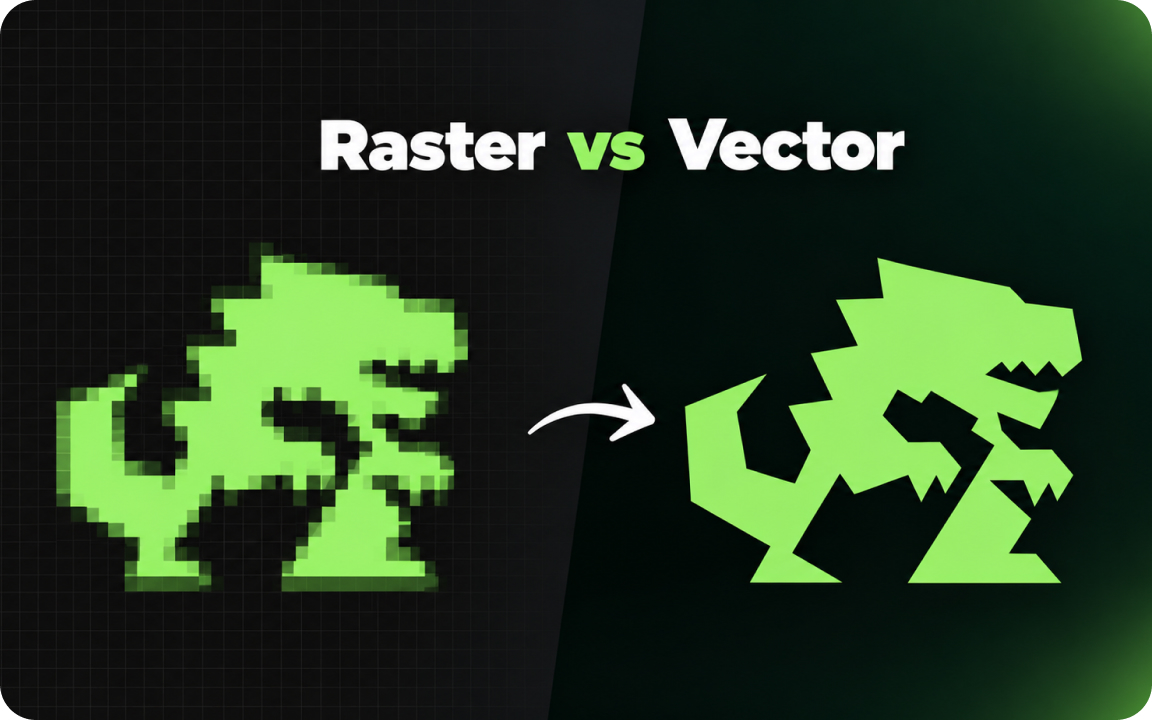
Raster images (JPG, PNG, GIF) are made of pixels and lose quality when enlarged. Vector images (SVG, AI, EPS, vector PDF) are made of mathematical shapes and stay sharp at any size. Use raster for photos and vector for logos, icons and anything that gets printed or resized.
Every image file is either raster or vector. The difference decides whether your logo stays sharp on a billboard or turns into a blurry mess on a business card. Logo vectorization was the first gig we ever sold on Fiverr, and most of the problems we still fix start with someone not knowing which type of file they have.
What is a raster image?
A raster image is a grid of tiny colored squares called pixels. Photos, screenshots and most images on the web are raster. Common raster formats are JPG, PNG, GIF, WebP and TIFF.
Raster images have a fixed number of pixels. When you enlarge them past their original size, the software has to invent new pixels, so edges become soft, blocky or blurry.
What is a vector image?
A vector image is made of shapes defined by math: points, lines and curves. Instead of storing every pixel, the file stores instructions like "draw a curve from here to here and fill it with this color". Common vector formats are SVG, AI, EPS and PDF (when the PDF contains vector artwork).
Because the shapes are recalculated at any size, a vector logo looks exactly as sharp on a 16-pixel favicon as on a 10-meter banner.
Raster vs vector (or vector vs raster) compared
| Raster | Vector | |
|---|---|---|
| Made of | Pixels | Paths and shapes |
| Scaling | Loses quality when enlarged | Stays sharp at any size |
| Formats | JPG, PNG, GIF, WebP, TIFF | SVG, AI, EPS, PDF |
| Best for | Photos, detailed textures, screenshots | Logos, icons, illustrations, type |
| Editing | Photoshop and similar editors | Illustrator, Figma and similar editors |
| Colors | Each pixel stores a color | Each shape stores a color, easy to change |
Vector vs raster for logos: why your logo should always be vector
- Printing. Printers, sign makers and embroidery shops ask for vector files because they need clean edges at any size.
- Color changes. In a vector file you can switch a logo to one color, white or a Pantone color in seconds.
- Future use. You will need the logo in sizes and places you cannot predict yet. A vector master file covers all of them.
Raster versions of your logo, such as a transparent PNG, are still useful for websites, documents and social media. They should be exported from the vector master, not the other way around.
How to tell if your file is vector
- Check the extension. JPG and PNG are always raster. SVG is vector. AI, EPS and PDF can be vector, but can also just contain a pasted raster image.
- Zoom in. Open the file and zoom to 800%. If edges stay crisp, it is vector. If you see pixels or blur, it is raster.
- Check in Illustrator. Open the file and switch to Outline view. A real vector logo shows its paths. A raster image shows an empty box with an X.
A common trap: an EPS or PDF file that only contains a low-resolution JPG. The extension looks right, but the file is still raster. Zooming in is the fastest way to find out.
Can you turn a raster image into a vector?
Yes, in two ways. Automatic tracing, such as Image Trace in Illustrator or online converters, guesses the shapes from the pixels. It works for simple, high-contrast logos, but usually leaves wobbly edges, too many anchor points and wrong colors.
Redrawing by hand means a designer rebuilds every shape with clean curves, matches the fonts and sets exact colors. It takes longer, but the result is a proper master file. We explain both methods step by step in how to vectorize a logo.
Related guides
We redraw raster logos by hand into clean AI, EPS, SVG, PDF and PNG files.
FAQ
Is PNG raster or vector?
PNG is always raster. It supports transparency, which makes it useful for logos on websites, but it cannot be enlarged without losing quality.
Is a PDF vector?
It can be. A PDF made from Illustrator usually keeps vector shapes, but a PDF can also just contain a pasted JPG. Zoom in to check.
Why do printers ask for vector files?
Vector files print with clean edges at any size, and colors can be set exactly for print, such as CMYK or Pantone.
Can I convert a JPG logo to vector?
Yes, by automatic tracing or by redrawing it by hand. Tracing works for simple logos; redrawing gives clean, accurate results for anything detailed.

Founder of SkyDesigner. Fiverr Pro Vetted designer, selling on Fiverr since 2014 with 24,500+ reviews.