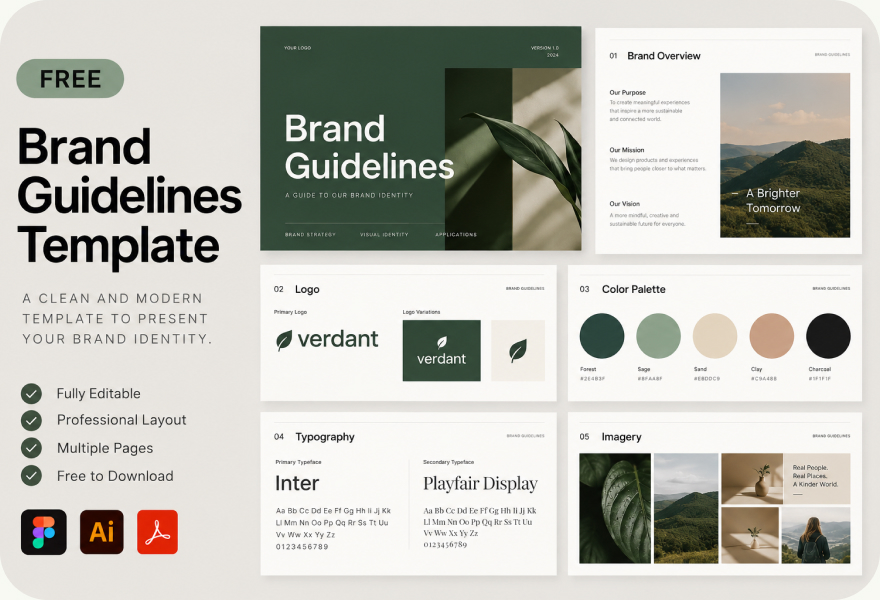
A simple brand guidelines template has eight sections: brand overview, logo, color palette, typography, imagery, voice and tone, applications, and files and contacts. Most small businesses can cover all eight in a short document and grow it as new questions come up.
Brand guidelines are the rulebook that keeps your logo, colors, fonts and voice consistent, no matter who designs the next flyer or social post. You do not need a 60-page PDF to get started. Most small businesses need eight sections, and a few pages per section at most.
Below is a free brand guidelines template (some teams call it a brand style guide template) that you can copy section by section into Figma, Google Docs, Canva or a PDF.
The 8-section brand guidelines template
| Section | What to include |
|---|---|
| 1. Brand overview | Mission or purpose in one sentence, who the brand is for, and three to five brand values. |
| 2. Logo | Primary logo, secondary or stacked version, icon or favicon mark, clear space rule, minimum size, and logo misuse examples (stretched, recolored, on busy backgrounds). |
| 3. Color palette | Primary and secondary colors with HEX, RGB, CMYK and Pantone values, plus rules for which combinations meet contrast requirements. |
| 4. Typography | Heading and body typefaces, weights, sizes for web and print, and a fallback font for email and documents. |
| 5. Imagery | Photo style, illustration style and icon style, with a few do and do-not examples. |
| 6. Voice and tone | How the brand sounds, three to five voice traits, and how tone changes for support, sales and social media. |
| 7. Applications | Examples on the website, social media, business cards, email signatures, presentations and merch. |
| 8. Files and contacts | Where to download logo files and fonts, and who to ask before using the brand in a new way. |
How to fill in each section
1. Brand overview
Keep this to one page. Write your purpose in one sentence, describe your audience in plain words and list three to five values. Everyone who reads the guidelines should understand who the brand is for before they see a single color.
2. Logo
Show every approved version of the logo on a light and dark background. Define clear space, usually the height of one letter or the icon, and a minimum size for print and screen. Add a short section of misuse examples, because showing what not to do prevents most mistakes.
3. Color palette
List each color with its HEX code for web, RGB for screens, CMYK for print and Pantone if you print professionally. Say which color is primary and roughly how much of each to use. Note which text and background combinations are readable.
4. Typography
Name one typeface for headings and one for body text, with the weights you use. Add a fallback, such as Arial or Georgia, for places where your brand font is not installed, like email and Word documents.
5. Imagery
Describe the photo and illustration style in a few words, for example "natural light, real people, no stock poses". Show three good examples and one bad example.
6. Voice and tone
List three to five voice traits with a short "we are / we are not" line for each. Mailchimp's public content style guide is a good model for this section.
7. Applications
Show the brand in use: website header, social post, business card, email signature and a slide. Real examples answer questions faster than rules.
8. Files and contacts
Link to one folder with logo files, fonts and templates, and name the person who approves new uses. Our guide to logo file formats explains which files belong in that folder.
Brand guidelines checklist
- Logo in AI, EPS, SVG, PDF and PNG, in full-color, one-color and reverse versions
- Clear space and minimum size defined
- Colors listed in HEX, RGB and CMYK
- Heading, body and fallback fonts named
- At least three logo misuse examples
- Voice traits with examples
- One folder link with every file
Start small. A short guide that people actually open beats a long one that sits in a folder. Add sections when real questions come up.
Prefer a ready-made design file?
If you would rather start from a designed file than a blank page, these free sources are a good starting point. Copy the structure above into whichever one you pick:
- Canva brand guidelines templates: easy to edit in the browser, good for small teams without a designer.
- Free brand guidelines template on Figma Community: best if your designer already works in Figma.
- Branding Style Guides archive: hundreds of real brand style guides to borrow ideas from.
Whatever tool you use, the template only works if it is filled with your real files, color codes and rules. A beautiful empty template does not keep a brand consistent.
Want to see real examples?
We break down what well-known companies include in theirs in brand guidelines examples.
Related guides
Our branding packages include logo, colors, typography and a brand guide your team can use.
FAQ
What should brand guidelines include?
At minimum: logo versions and rules, color codes, typography, imagery style, voice and tone, examples in use, and where to find the files.
How long should brand guidelines be?
As short as possible. Many small businesses need only a few pages per section. Add detail when real questions come up.
What is the difference between a style guide and brand guidelines?
Brand guidelines cover the visual identity and voice. A style guide often focuses on writing rules or a design system for a website or app.
What tool should I use to make brand guidelines?
Any tool your team can open: Figma, Google Docs, Canva or a PDF. Being easy to find and update matters more than the tool.

Founder of SkyDesigner. Fiverr Pro Vetted designer, selling on Fiverr since 2014 with 24,500+ reviews.